Windows 7

If anyone out there knows me, they know that I’m not really the biggest of Windows fans. Heck, I’ve probably been anti-Microsoft for most of my life thus far. I grew up on Apples (Macintosh) and then slowly attempted to gain knowledge of Linux systems (I still have a FreeBSD 4.1 CD somewhere). I didn’t actually own a Windows system until 2001 – at which time I was running a 1.4GHz AMD Athlon with 512MB RAM a 20GB HD and Windows 2000 Professional.

Then I moved onto building a crap-load (technical term here) more systems and slowly making my way up the chain. Heck, here’s a timeline if I can remember them all:

Mac OS 6.1 (Finder 4.5 I believe) was running on my first computer a MacSE (Retired)
8.9" BW Screen, 8MHz, 1MB RAM, 20MB HD, 720KB Floppy

Mac OS 7.5 was my first color computer on a PowerMac 7100/80AV (Retired)
14" Samsung CRT, 80MHz PowerPC, 16MB RAM upgraded to 48MB, 700MB HD upgraded to 2.1GB, 2X CD-ROM upgraded to 12X CD-ROM, 1.4MB Floppy, 10Base-T

Mac OS 8.1 was our first internet-enabled computer on a PowerMac G3 233 (Retired)
15" ViewSonic CRT, 233MHz G3, 128MB RAM upgraded to 384MB, 4GB HD upgraded to 20GB, 16X CD-ROM upgraded to 4x2x24 CD-RW, 1.4MB Floppy, 100MB Zip, 100Base-T

Mac OS 9.1/OSX 10.1 was my college computer on a G4 450 Gigabit Ethernet (Retired)
15" no brand LCD, Dual 450MHz G4, 256MB RAM upgraded to 1.25GB, 20GB HD upgraded to 3X 80GB, 8X DVD-ROM upgraded to 12X CD-RW/DVD Combo, 1000Base-T

Mac OS 9.1/OSX 10.1 on my first portable system – an iBook G3 (white one) (Retired)
13.1" LCD, 800MHz, 256MB RAM upgraded to 768MB, 20GB HD, 24X CD-ROM, 100Base-T

Redhat 6? on my first non-Mac system repurposed Sony unknown Model (Sold)
14" Samsung CRT on KVM, 233MHz Intel Pentium II, 32MB RAM upgraded to 64MB, 2.1GB HD, 100Base-T

FreeBSD 4.1 on my first non-GUI computer home built system (Retired)
No monitor, 350MHz AMD K6-2, 128MB RAM, 20GB HD, 12X CD-ROM, Dual 100Base-T

Windows 2000 Professional on a home built system (Sold)
15" no brand LCD via KVM, 1.4GHz AMD Athlon, 512MB RAM, 20GB HD, 24X CD-RW, 1.44 Floppy, 100Base-T

Mandrake 8 on a home built system (Broken/Trashed)
No monitor, 450MHz AMD K6-2, 512MB RAM, 40GB HD, 100Base-T

Windows XP on a home built system (LAN Source Server)
17" ViewSonic LCD, 1.6GHz AMD Athlon, 512MB RAM, 40GB HD, 24XCD-ROM, 100Base-T

Windows XP on a Compaq V5000 CTO laptop (Sold to Family)
15" LCD, 1.8GHz AMD Athlon, 256MB RAM upgraded to 2048MB, 20GB HD upgraded to 120GB, 12X DVD-ROM, 100Base-T

Windows XP on a home built system (Repurposed – see next)
17" Viewsonic LCD on KVM, 2.6GHz Intel P4, 512MB RAM upgraded to 2048MB, 120GB HD upgraded to 2x 120GB and 400GB, 12X DVD-RW, 1000Base-T

Windows Server 2008 on a home built system (Primary Domain Controller)
No Monitor, 2.6GHz Intel P4, 2048MB RAM, 2x 500GB and 2x 750GB, 12X DVD-RW, 1000Base-T

Windows Vista Ultimate 64bit on a home built system (Gaming Rig)
19" Samsung LCD, 2.5GHz Intel Core2Duo, 4096MB RAM, 500GB HD, 24X CD-RW, 1000Base-T

Windows XP on a home built system (Media Center)
42" Toshiba TV 1080P, 2.5GHz Intel Core2Duo, 1024MB RAM, 1TB HD, 24X CD-ROM, 1000Base-T

Windows 7 Enterprise 64bit on a home built system (Work Computer)
21.5" Acer LCD and 19" Dell LCD, 2.5GHz Intel Core2Duo, 8192MB RAM, 500GB HD, 24X DVD-RW, 1000Base-T

Windows 7 Enterprise 64bit and Ubuntu 9.04 64bit dual boot on an HP NX6245 (Primary Laptop)
14.1" LCD, 2.2GHz AMD X2, 3072MB RAM, 120GB HD upgraded to 320GB, 16X DVD-RW, 1000Base-T, 802.11g

Windows XP on an Asus eeepc (Family Laptop)
10.1" LCD, 1.6GHz Intel Atom, 2048MB RAM, 160GB HD, 100Base-T, 802.11g

I know there’s at least 2 more that I’m missing, but one I sold and I am pretty sure that the other one broke and I chucked it away.

Oh, now that I read my title I see the point I was trying to make: I’ve had a lot of computers and a lot of experience with computer operating systems. That being said, here is how I would rate them:

Gaming:
1.) Windows XP Pro
2.) Windows Vista/7
3.) Windows 2000 Pro
4.) MacOS 8-9
5.) MacOS X
6.) Any Linux

Business (No issues connecting to AD or a domain):
1.) Windows XP Pro
2.) Windows 2000 Pro
3.) Windows Vista/7
4.) Linux
5.) MacOS X

Entertainment/Movies:
1.) MacOS X
2.) Windows Vista/7
3.) Mac OS 8-9
4.) Windows XP Pro
5.) Linux
6.) Windows 2000 Pro

Battery Usage/Portability:
1.) Windows Vista/7
2.) Linux
3.) MacOS X
4.) Windows XP Pro
5.) MacOS 8-9
6.) Windows 2000 Pro

Speed (Startup/Apps loading/Internet usage):
1.) Windows 7
2.) Windows 2000 Pro
3.) Linux
4.) Windows XP Pro
5.) MacOS 8-9
6.) MacOS X

Some of these results are skewed as I haven’t been able to play with the latest and greatest. The last Mac I used was a dual 1.25GHz G4 with 1.5GB RAM. Nice machine, but no comparison for gaming to a Windows machine. Overall it depends on how you want to use your computer.

Server:
Linux

Gaming Station:
Windows

Graphic Design/Video Editing:
Mac

Business Computer:
Windows

***EDIT***
Windows 7 was installed on my work system September 10th 2009 and thus far has exceeded all of my expectations. I have yet to have the system crash and almost all of my applications continue to function correctly under Windows 7 64bit. I’ve had to reboot the system 4 times total – and three of them were after installing software that required a reboot. The fourth was rebooting for an extended weekend (I can just hear a greenie now…) Otherwise, with 8GB TAM this thing is flying.
Menu Popup Delay Windows XP, Vista, 7

If you’re anything like me, you hate to wait for anything – especially your computer. The computer should be waiting for me, not the other way around!

The menu delays in Windows have always aggravated me. I want the menu to pop up almost as soon as the cursor is over it. Now I must admit that the delay is VERY HELPFUL to older and younger peoples. If I tried to teach my grandmother using my preferences, she’d wiggle the cursor all over the screen and never be able to select what she wanted. The same goes for my 6 year old niece – the young and old don’t have the fine control over motor functions at the same level as the middle aged.

You may argue with me saying “I’m not middle-aged and I can run circles around you with my mouse!” That’s all besides the point. Point is, here’s how to do it:

Reminder: Any actions you take in the registry could adversely affect your system. I am not responsible for you breaking your system. The following directions worked for me, and if you follow them correctly they should also work for you.

Open up the registry editor
Start > Run > regedit
Navigate to HKCU\Control Panel\Desktop
Computer\HKEY_CURRENT_USER\Control Panel\Desktop
Find the MenuShowDelay key
Set the Value data to be any number you want. The numbers are measured in MS (milliseconds) and the default is 400. I set mine to 1.

Activesync, Exchange 2003, ISA2004

I just started a new job (after being fired the last day of my honeymoon from another company), and one of my tasks was to get people with iPhones the ability to sync with the Exchange server. IMAP and POP were already opened up, but those aren’t actually using Activesync abilities. I wanted push and not pull technology!

After working with Exchange 2007 for so long it takes a little time to get used to 2003 again. So bear with me.

Open up the Exchange System Manager
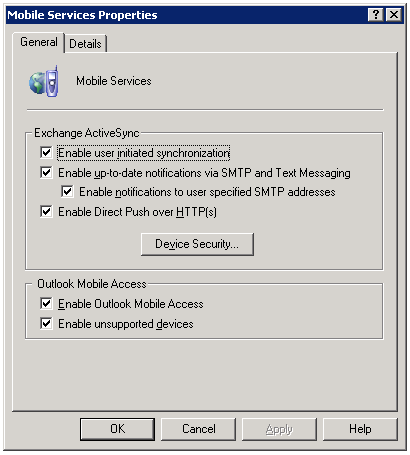
Under Global Settings, right click on Mobile Services and select Properties
MobileServicesProperties
Make sure that you select the bottom two check boxes.

Then, on your ISA server, you must create the rule to allow mobile outlook access to:
/*
You may already have something like /exchange/*, /owa/* etc, but you do need the entire directory to be allowed access.

htaccess deny range of IPs

I was recently fired from my old job. It wasn’t a good firing – no reason behind it, and they’re being jackasses to me afterwards. So, 4 weeks later I notice that someone is still accessing my site, my personal help site, from one of their IP addresses. That can’t be. I can’t allow a company to fire me without a reason and then just let them use all of my work. Screw that.

So I did what anyone would do to prohibit these cretins from stealing my work:
edit the htaccess file to disallow their entire subnet.

SSH into your site
nano .htaccess – this will create the file if you don’t already have it
add the following:

order allow,deny
deny from 69.213.173.0/24
#deny from 69.213.173.144
allow from all
ErrorDocument 403 http://it.thelibrarie.com/errors/forbid.html

69.213.173.144 is their gateway (I should know, I only put in 4 years there). Last I checked it was a Sonicwall 4100 Pro, but they were trying to switch it out with a pair of Cisco ASA 5510’s. On a final note: Fuckers.

7zip Batch File and Rotate File Names

Here’s the scenario:
Customer has a syslog server (Kiwi’s free syslog server) running on Windows2003 Server on a crappy 100GB server. They wanted a way to rotate the logs (free version does not allow for automatic rotation) and compress the logs. Every hour the syslog file grows by 7MB. That might not seem like a lot, but each month that’s 5.2GB and every year it’s 61GB. OK, maybe that’s not a lot to you, but on a 100GB server it adds up quickly.

I compressed a test log of 46MB. It compressed to 8KB. Wow, eh? 7Zip is free, you can download it using sourceforge so it’ll run on Windows or linux.

I wrote up a batch file to auto grab, compress, and name the file after the date. You’ll need to add the 7z variable to the system path to make things easier (system variables, under path add C:\program files\7-zip)

@echo off
7z a c:/%date:~4,2%-%date:~7,2%-%date:~10,4%-syslog.7z c:/test/
pause

As a breakdown, the first line turns off writing the commands on the executed script window.
7z is the executable, a is add files, the date spits out month-day-year followed by -syslog.7z, c:/test/ is the path you want compressed
Pause just makes it so you have to hit enter to close the command window

Obviously change the c:/test/ to something you want to backup. You can also use c:/test/test.jpg as a specific file name.

How To Reboot A Juniper Netscreen Firewall Via GUI

Sorry for the lack of posts lately – I recently got married, had a honeymoon, and was fired all within the last month. Stick around, I’ll be sure to post more when I get a new gig – until then I’ll just stick with my on the side consulting services.

I’m not too familiar with Juniper stuff as every place that I’ve been employed only used Cisco/less than Cisco gear. However, at a recent client I was given the task of rebooting a Netscreen that was acting up. Uptime on the netscreen50 was at 410 days (they don’t patch much), but I’ve heard of routers and switches going for several years between reboots. However, this router is an outward facing router with VPN support.

To reboot, log into the web interface (GUI stands for Graphical User Interface). Then navigate to Configuration, Update, ScreenOS/Keys. You’ll see at the bottom of this screen a “Reset” button. Click this button – the netscreen will then ask if you are sure you want to perform this action. Obviously if you want to reboot it click OK, otherwise click cancel.

Within a few minutes you should be back up and running.