Rancid stands for Really Awesome New Cisco confIg Differ. It’s produced by Shrubbery Networks (http://www.shrubbery.net/rancid/). Basically it’s sole purpose is to make backups of your networking gear. And it can email you of any changes as well. This documentation is a work in progress – I had attempted to setup a rancid server one other time, but ran out of courage shortly after the beginning. And I’m compiling based on a few other internet sources.
Started with a 10.04.3 LTS server with LAMP/Mail(postfix) installed. x86 for those who care. For those who don’t care, it’s still on an x86 system.
I started installation, like all of my other projects, by switching to root:
su
I also created the rancid user with a password:
adduser rancid
Install the Rancid Base:
apt-get install rancid
y
Edit the Rancid Configuration by adding groups:
nano /etc/rancid/rancid.conf
LIST_OF_GROUPS="Group1 Group2 ... Group18"
Save and Quit
Edit the Mail Aliases:
nano /etc/aliases
rancid-Group1: root
rancid-admin-Group1: root
rancid-Group18: root
rancid-admin-Group18: root
Save and Quit
Restart Your Mail Services:
/etc/init.d/postfix restart
Run rancid CVS Groups:
sudo su -c /var/lib/rancid/bin/rancid-cvs -s /bin/bash -l rancid
You should now see a few new directories created in /var/lib/rancid:
/Group1
/Group2
…
/Group18
We want to edit the configuration files in each of these groups to reflect the devices. We’ll start with /Group1:
cd /var/lib/rancid/Group1
nano router.db
IPADDRESS_OR_HOSTNAME:brand:up_or_down
If you select down, rancid will not actively check this device.
Example:
10.10.0.1:cisco:up
10.15.0.1:cisco:up
10.20.0.20:cisco:up
At one time, whilst setting this up for the first time, I thought that you could only have one login/enable for the entire system. I found that quite “uncool”. Luckily for everyone reading this, I found out that I was incorrect with my assumption. It’s actually quite easy now that I look back on the configuration.
Create A Password File:
The installation of rancid on ubuntu will attempt to create a user called “rancid” with a home directory of /var/lib/rancid, but a login point of /dev/null. But, since we already created the “rancid” user, we must create a cloginrc file to house the passwords for your cisco gear in this user’s home directory. If you run this as root, it’ll be in /root/.clogin.rc
nano /home/rancid/.cloginrc
add method * telnet
add password IPADDRESS_OR_HOSTNAME LOGINPASSWORD ENABLEPASSWORD
add password OTHERIP_OR_HOSTNAME LOGINPASSWORD ENABLEPASSWORD
Save and exit
For SSH:
add autoenable * 1
add method IPADDRESS ssh
add user IPADDRESS USERNAME
add userpassword IPADDRESS PASSWORD

add password IPADDRESS PASSWORD ENABLEPASSWORD
Change permissions of the password file (isn't necessary now that I created the user to begin with):
chmod 640 /var/lib/rancid/.cloginrc
chown rancid /home/rancid/cloginrc
Run the rancid server:
sudo su -c /var/lib/rancid/bin/rancid-run -s /bin/bash -l rancid
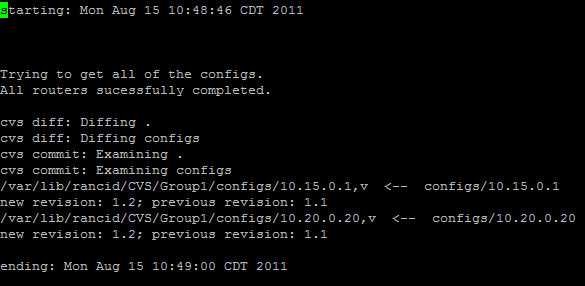
View the Log Files:
nano /var/log/rancid/GROUPNAME.DATE.TIME
Where Are The Configuration Files?
/var/lib/rancid/CVS/GROUPNAME/configs/IP_OR_HOSTNAME,v
Too Much Information:
If you feel like you only want to have the configuration files and not the proc info/mem info etc, just edit the following file:
nano /var/lib/rancid/bin/rancid
Search for "# Mail"
Comment out lines you no longer wish to document
Save and Quit
Add the Web GUI:
apt-get install cvsweb
nano /etc/cvsweb/cvsweb.conf
Find "@CVSrepositories"
Add:
'rancid' => ['Rancid', '/var/lib/rancid/CVS'],
Save and Quit
Restart apache
apache2ctl restart
sudo ~rancid/bin/rancid-run(or, if in as root,rancid-run)
You can now open a web browser to http://IPOFSERVER/cgi-bin/cvsweb
EMail testing
I am having a few issues with email aliases - you're supposed to be able to utilize "rancid-NAMEOFDEVICE: real email" or the like for it to forward. I was getting NDRs as it was trying to send locally. So I temporarily changed the NDR to all send to the email address I wanted to send anyway.
Cron job
I cron this for every 10 minutes - but it takes longer and longer to check all the devices on the network when I keep adding more and more to the configuration.
Sample Configuration (/home/rancid/.cloginrc):
add method 10.15.1.245 telnet
add method 10.15.1.246 telnet
add method 10.11.0.2 ssh
add user 10.11.0.2 rancid
add userpassword 10.5.0.2 P@SSw0rd
add password 10.15.1.246 P@55 3n@bL3
add password 10.15.1.245 P@55 3n@bL3
add password 10.11.0.2 P@SSw0rd 3n@bL3
***EDIT***
Sometimes I'm a little slow when it comes to problems with workarounds - I mean, why fix something when it's only halfway broken?
I forgot that when you edit the /etc/aliases file that you have to run the command newaliases to update the /etc/aliases.db file. Otherwise you'll see "warning: database /etc/aliases.db is older than source file /etc/aliases" in your /var/log/mail.info file. And away we go!
***EDIT 2***
If you put in hostnames instead of IP addresses (preferred method as it makes it easier to find in the list later), it's recommended to add static address aliases instead of relying on DNS.
nano /etc/hosts
IPADDRESSOFDEVICE NAMEOFDEVICE NAMEOFDEVICE.DOMAIN.TLD
Ping the name of the device and verify you have resolution.
Also, I found that rancid HATES capital letters. Recommended that everything be lowercase. ESPECIALLY in your .clogin file!!! I found this out with tail -45 /var/log/rancid/LATESTFILEHERE
And, if you follow my above installation procedure, you will find the main page loads without any icons. I sorted this out by the following:
mkdir /var/www/icons
nano /etc/apache/sites-enabled/000-default
Find Alias /doc/ "/usr/share/doc/"
Add the following below it
Alias /cvsweb/icons/ "/var/www/icons/"
Save and quit
apache2ctl restart
Load the dir.gif, back.gif, and text.gif files of your choosing into the /var/www/icons directory


***EDIT 3***
I set this to cron every hour and email changes - it kept emailing the same router.db retrieving version 1.21 over and over - every hour.
I checked the logs (/var/lib/rancid/logs/NEWESTDATE) and found:
cvs commit: Up-to-date check failed for `configs/IPADDRESS'
Just go to
cd /var/lib/rancid/NAMEOFGROUP/configs
and run
cvs update
Rerun rancid and verify
rancid-run
The cron job was a little lacking for our implementation – we wanted a way to annotate the changes that were made to devices, and enter them into the repository immediately as they are made. I decided to write a wrapper script for RANCID that would do the following: