All posts by bsdman

Currently working as an IT Manager. Worked for an OIT company as a Network Engineer in 2011. Worked for a Medical IT company as the Network Administrator 2009-2011. Worked as the Senior Systems Administrator at a computer reseller from 2005-2009. Worked as a Computer Consultant for several small companies from 2007-2009. Worked as a Computer Technician at a computer reseller from 2002-2004.

Activesync, Exchange 2003, ISA2004

I just started a new job (after being fired the last day of my honeymoon from another company), and one of my tasks was to get people with iPhones the ability to sync with the Exchange server. IMAP and POP were already opened up, but those aren’t actually using Activesync abilities. I wanted push and not pull technology!

After working with Exchange 2007 for so long it takes a little time to get used to 2003 again. So bear with me.

Open up the Exchange System Manager
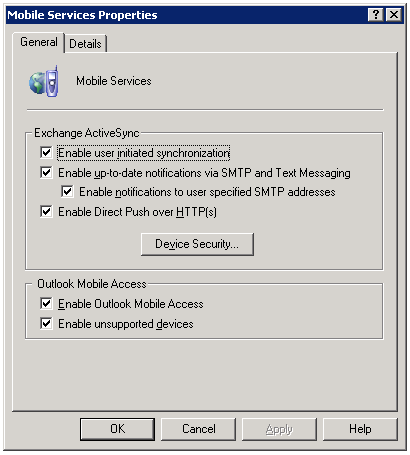
Under Global Settings, right click on Mobile Services and select Properties
MobileServicesProperties
Make sure that you select the bottom two check boxes.

Then, on your ISA server, you must create the rule to allow mobile outlook access to:
/*
You may already have something like /exchange/*, /owa/* etc, but you do need the entire directory to be allowed access.

htaccess deny range of IPs

I was recently fired from my old job. It wasn’t a good firing – no reason behind it, and they’re being jackasses to me afterwards. So, 4 weeks later I notice that someone is still accessing my site, my personal help site, from one of their IP addresses. That can’t be. I can’t allow a company to fire me without a reason and then just let them use all of my work. Screw that.

So I did what anyone would do to prohibit these cretins from stealing my work:
edit the htaccess file to disallow their entire subnet.

SSH into your site
nano .htaccess – this will create the file if you don’t already have it
add the following:

order allow,deny
deny from 69.213.173.0/24
#deny from 69.213.173.144
allow from all
ErrorDocument 403 http://it.thelibrarie.com/errors/forbid.html

69.213.173.144 is their gateway (I should know, I only put in 4 years there). Last I checked it was a Sonicwall 4100 Pro, but they were trying to switch it out with a pair of Cisco ASA 5510’s. On a final note: Fuckers.

7zip Batch File and Rotate File Names

Here’s the scenario:
Customer has a syslog server (Kiwi’s free syslog server) running on Windows2003 Server on a crappy 100GB server. They wanted a way to rotate the logs (free version does not allow for automatic rotation) and compress the logs. Every hour the syslog file grows by 7MB. That might not seem like a lot, but each month that’s 5.2GB and every year it’s 61GB. OK, maybe that’s not a lot to you, but on a 100GB server it adds up quickly.

I compressed a test log of 46MB. It compressed to 8KB. Wow, eh? 7Zip is free, you can download it using sourceforge so it’ll run on Windows or linux.

I wrote up a batch file to auto grab, compress, and name the file after the date. You’ll need to add the 7z variable to the system path to make things easier (system variables, under path add C:\program files\7-zip)

@echo off
7z a c:/%date:~4,2%-%date:~7,2%-%date:~10,4%-syslog.7z c:/test/
pause

As a breakdown, the first line turns off writing the commands on the executed script window.
7z is the executable, a is add files, the date spits out month-day-year followed by -syslog.7z, c:/test/ is the path you want compressed
Pause just makes it so you have to hit enter to close the command window

Obviously change the c:/test/ to something you want to backup. You can also use c:/test/test.jpg as a specific file name.

How To Reboot A Juniper Netscreen Firewall Via GUI

Sorry for the lack of posts lately – I recently got married, had a honeymoon, and was fired all within the last month. Stick around, I’ll be sure to post more when I get a new gig – until then I’ll just stick with my on the side consulting services.

I’m not too familiar with Juniper stuff as every place that I’ve been employed only used Cisco/less than Cisco gear. However, at a recent client I was given the task of rebooting a Netscreen that was acting up. Uptime on the netscreen50 was at 410 days (they don’t patch much), but I’ve heard of routers and switches going for several years between reboots. However, this router is an outward facing router with VPN support.

To reboot, log into the web interface (GUI stands for Graphical User Interface). Then navigate to Configuration, Update, ScreenOS/Keys. You’ll see at the bottom of this screen a “Reset” button. Click this button – the netscreen will then ask if you are sure you want to perform this action. Obviously if you want to reboot it click OK, otherwise click cancel.

Within a few minutes you should be back up and running.

Awstats Scheduled Task 0x1 Error

After installing Perl, Awstats, IIS6.0 and all the available Windows Updates on a system, I mapped drive shares on several other webservers. I mean, why install perl and awstats on each individual server when I can have a virtual machine ready and waiting and have no downtime on the production sites?

So I had the batch script file setup to update the stats every 5 minutes for 24 hours of every day (288 updates a day):

@echo off
cd C:\Inetpub\wwwroot\awstats\cgi-bin
awstats.pl -config=myconfig -update

I saved it as Test.bat, opened up the batch file to test it out and it ran AND updated perfectly. Yay, that wasn’t too difficult.

But then I created an automated task in Windows. Run it every 5 minutes. Error 0x1 every time. WTF??

It’s because “Perl is an interpreted language, and you cannot define a task priority or a maximum CPU usage value when you run a Perl program” (thanks Devx.com!). You have to start the command first.

So the finished code should look like this:
@echo off
cd C:\Inetpub\wwwroot\awstats\cgi-bin
start awstats.pl -config=myconfig -update

Try to run it again, works when just opening the BAT file. Then try it automated. 0x0!

VMWare Server High Processor Usage

We have VMWare server 2.0 installed on a few servers for testing purposes. In fact, our entire development infrastructure is on 3 different VMWare server 2 servers.

One of the guest OSes was running Windows 2003 Enterprise R2 SP2 with a SQL server (2005 of Microsoft) and a web server (IIS6). The system process ended up using anywhere from 20 to 75% of the CPU usage. So what was causing this?

I started with the usual suspects – services that shouldn’t have been running. Nothing helped on that end.

Then I grabbed a copy of Sysinternals’ ProcessExplorer. It showed that I had anywhere from 20 to 75% use from Interrupts/Hardware Interrupts. What exactly is a hardware interrupt? It is when a piece of hardware needs to wait for the CPU in order to finish it’s task. If you’re using a CD-ROM drive in PIO mode instead of DMA you will see quite a few more hardware interrupts. But I wasn’t using a CD-ROM. It was just an idle server.

Quick search around the block and I removed the USB controller on the VMWare config side. That lowered the interrupts by about 8%. Not a heck of a lot, but it was something.

Then I took the advice of another technician – change out the generic AMD flavor of network card for the more robust Intel driver.

Download the intel driver (http://support.intel.com/support/network/sb/cs-006120.htm)
Shutdown your VMWare guest OS
Edit the .vmx file
Add Ethernet0.virtualDev = “e1000” somewhere in the ethernet ‘section’
Turn your machine back on
Your machine will now find new hardware. If it doesn’t auto install that’s no big deal since you downloaded the drivers already and you can then install them.

Now my interrupts are below 30 with an average around 12. That’s quite a bit more usable.

Configure Cisco To Work With Windows NLB

Cisco switch, Microsoft Windows Network Load Balancing.

As part of our new site roll-out we’re using quite a few servers. Some are running in tandem while others are complete backups just in case. Basically, for every function we’re running at least 4 servers (2 load balanced front-facing, 1 backup, and 1 dev/testing).

Using load balancing is a little more tricky on our environment.

On the test environment, which is strictly a vmware server with a crap-load (technical term) of virtual machines, the Microsoft Load Balancing works without any problems. Create a virtual IP, point both servers to it, and away you go.

Unfortunately for us this didn’t work so well on the live production servers. Why? The servers required multicast load balancing. Cisco switches don’t work well with multicast load balancing. The router refuses to learn the ARP for the IP address if it’s coming from a multicast MAC. I had previously switched the servers to unicast, which solved the problem within the Cisco switches, but then the applications would not function on the servers.

One must create a Static ARP Entry on the gateway switch.

For this exercise I have a switch (192.168.1.245) and a server (192.168.1.173) and a client (192.168.2.202) all of which are Class C /24 255.255.255.0 addresses. You will need to know the IP of your server’s Virtual IP (the one for load balancing) and the MAC address of the virtual IP. Easy way to find this is to open a cmd window and type the following:
arp -a 192.168.1.173
OR you can open the network load balance manager and find it listed on the first screen under MAC/physical address.

Now we need to configure your switch

Telnet to your device
Type in your password
Go to enable mode
en
Configuration terminal
config t
arp 192.168.1.173 0100.7f5e.ad01
end
wr mem

Now your pings should work.